BullKey is a convenient and powerful keyboard. Features of BullKey Keyboard:
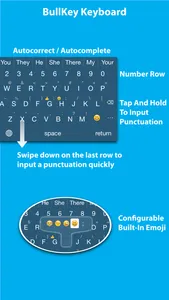
1. Number row
2. Tap and hold a button to input punctuation
3. Tap and hold a button to show additional keys including emoji
4. Customizable additional keys
5. Tap the smiley face button to show a full-screen emoji selector. You don't need to switch to another keyboard.
6. Face marks (Japanese Kaomoji, 顔文字, for example, (´・ω・`) )
7. Swipe down on Z, X, C, V, B, N or M to input a punctuation quickly.
8. Double tapping the space bar will insert a period followed by a space.
9. Multi-touch! You don't need to lift one finger before tapping with the next finger.
10. Auto-Capitalization
11. Autocomplete
12. Autocorrect
13. Supporting shortcuts. For example, you can type "omw" to input "On my way!" (You must define your shortcuts in Settings > General > Keyboard > Shortcuts)
14. Multiple themes
1. Number row
2. Tap and hold a button to input punctuation
3. Tap and hold a button to show additional keys including emoji
4. Customizable additional keys
5. Tap the smiley face button to show a full-screen emoji selector. You don't need to switch to another keyboard.
6. Face marks (Japanese Kaomoji, 顔文字, for example, (´・ω・`) )
7. Swipe down on Z, X, C, V, B, N or M to input a punctuation quickly.
8. Double tapping the space bar will insert a period followed by a space.
9. Multi-touch! You don't need to lift one finger before tapping with the next finger.
10. Auto-Capitalization
11. Autocomplete
12. Autocorrect
13. Supporting shortcuts. For example, you can type "omw" to input "On my way!" (You must define your shortcuts in Settings > General > Keyboard > Shortcuts)
14. Multiple themes
Show More