
AppRecs review analysis
AppRecs rating 3.0. Trustworthiness 62 out of 100. Review manipulation risk 24 out of 100. Based on a review sample analyzed.
★★★☆☆
3.0
AppRecs Rating
Ratings breakdown
5 star
0%
4 star
33%
3 star
33%
2 star
33%
1 star
0%
What to know
✓
Low review manipulation risk
24% review manipulation risk
About Net Analyze Defender
**Net Analyze Defender** is a network diagnostics and toolkit app for everyday and power users. It helps you check connection status, latency, and connectivity on iPhone and iPad.
**Core Features**
• **Home Network Status**
Live connection type (WiFi / Cellular), latency (from real ICMP ping), signal strength, and local / external IP. A health score combines latency, DNS, and signal for a quick overview.
• **Quick Tests**
- **Full Assessment**: Multi-round tests for connectivity, latency (ICMP ping), DNS resolution, download speed, and stability (packet loss), with an overall score and report.
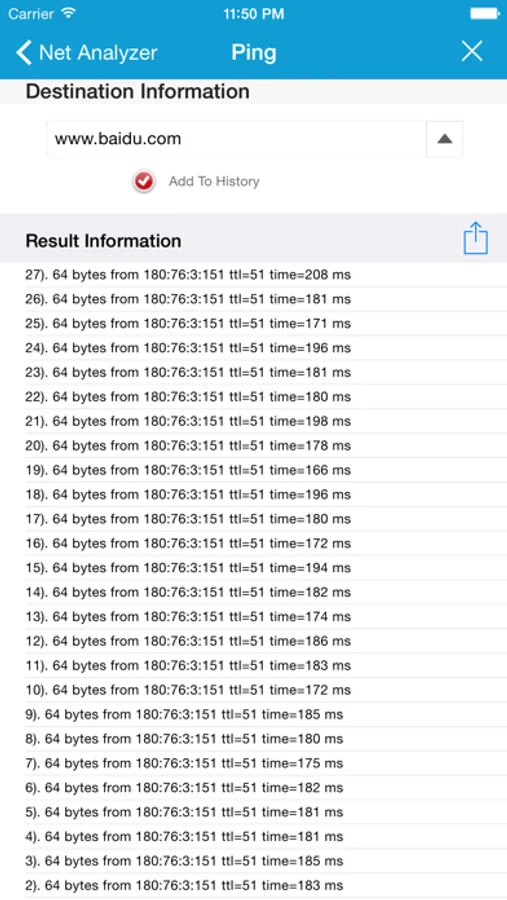
- **Ping Test**: Custom target and count; real ICMP ping (SimplePing) with latency and packet loss stats.
- **Download Speed**: Measure current download bandwidth.
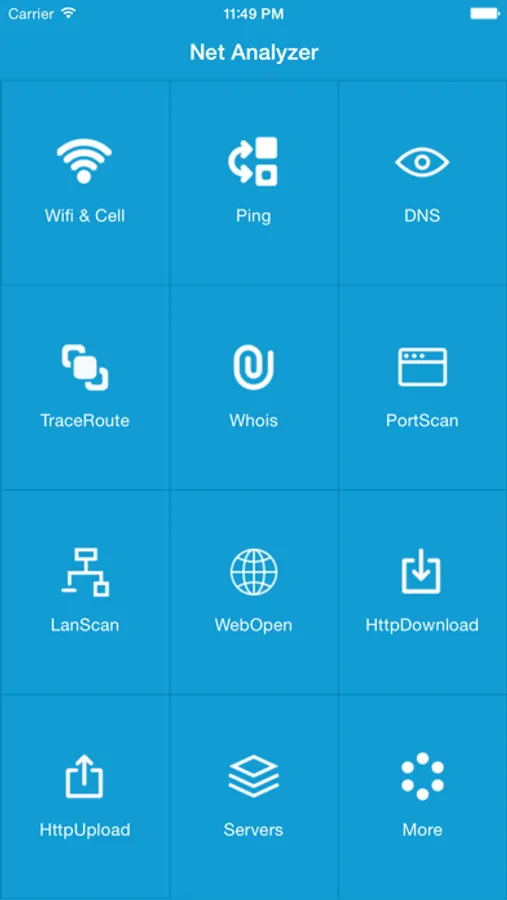
• **Pro Tools (Toolbox)**
- **Ping**: ICMP ping to any host or domain with RTT and statistics.
- **Web Test / Web Analysis**: Page load time or request and resource analysis.
- **Download / Upload**: HTTP bandwidth tests.
- **Traceroute**: See each hop to the target.
- **LAN Scan**: Discover devices, open ports, and response times on your network.
- **DNS**: Resolve domain names to IPs and more.
- **Whois**: Domain registration lookup.
- **Port Scan**: Check open ports on a host.
- **WiFi Info**: Current WiFi details.
- **SSL Certificate**: View site SSL certificate info.
- **HTTP Analysis**: Request/response headers and more.
- **Bonjour**: Discover Bonjour services on the LAN.
- **IPv6**: IPv6 connectivity check.
- **Proxy**: System proxy detection.
- **DoH (DNS over HTTPS)**: Encrypted DNS resolution test.
- **Congestion**: Compare idle vs loaded latency to gauge congestion.
**More**
• **Simplified Chinese / English** in-app language switch.
• Free tier has limited daily uses per tool; subscribe to Pro for unlimited access and ad-free experience.
• Latency and stability use real ICMP ping when possible; if ICMP is blocked, HTTP fallback is used so the home screen and full assessment still show meaningful latency.
Ideal for network admins, developers, and anyone who wants to understand or troubleshoot their network.
【Terms of Use (EULA)】
https://www.apple.com/legal/internet-services/itunes/dev/stdeula/
**Core Features**
• **Home Network Status**
Live connection type (WiFi / Cellular), latency (from real ICMP ping), signal strength, and local / external IP. A health score combines latency, DNS, and signal for a quick overview.
• **Quick Tests**
- **Full Assessment**: Multi-round tests for connectivity, latency (ICMP ping), DNS resolution, download speed, and stability (packet loss), with an overall score and report.
- **Ping Test**: Custom target and count; real ICMP ping (SimplePing) with latency and packet loss stats.
- **Download Speed**: Measure current download bandwidth.
• **Pro Tools (Toolbox)**
- **Ping**: ICMP ping to any host or domain with RTT and statistics.
- **Web Test / Web Analysis**: Page load time or request and resource analysis.
- **Download / Upload**: HTTP bandwidth tests.
- **Traceroute**: See each hop to the target.
- **LAN Scan**: Discover devices, open ports, and response times on your network.
- **DNS**: Resolve domain names to IPs and more.
- **Whois**: Domain registration lookup.
- **Port Scan**: Check open ports on a host.
- **WiFi Info**: Current WiFi details.
- **SSL Certificate**: View site SSL certificate info.
- **HTTP Analysis**: Request/response headers and more.
- **Bonjour**: Discover Bonjour services on the LAN.
- **IPv6**: IPv6 connectivity check.
- **Proxy**: System proxy detection.
- **DoH (DNS over HTTPS)**: Encrypted DNS resolution test.
- **Congestion**: Compare idle vs loaded latency to gauge congestion.
**More**
• **Simplified Chinese / English** in-app language switch.
• Free tier has limited daily uses per tool; subscribe to Pro for unlimited access and ad-free experience.
• Latency and stability use real ICMP ping when possible; if ICMP is blocked, HTTP fallback is used so the home screen and full assessment still show meaningful latency.
Ideal for network admins, developers, and anyone who wants to understand or troubleshoot their network.
【Terms of Use (EULA)】
https://www.apple.com/legal/internet-services/itunes/dev/stdeula/
Net Analyze Defender Screenshots
Tap to Rate:
Reviews for Net Analyze Defender
The keyboard dancer
In app malfunctions
Whois doesn’t work just exits app. No options to extend hops in backtrace. No options for ping. Like the idea and theory behind the app but seems limited good app if these issues are addressed
SFGeek
Full screen Ads! Whois crashes app
You can pay 99 cents to get rid of the ads.







![红楼梦经典回味 [简 繁] icon](https://apprecs.org/ios/img/icons/webp/150/523133414/JpH_sfipnFKl1jKIuFYCJZRbgzKVrMas32xvuhr1lDo-icon)