TI Nspire Calculator Manual
Di Venisco UG (haftungsbeschrankt)
2.8 ★
34 ratings
$4.99
AppRecs review analysis
AppRecs rating 2.7. Trustworthiness 80 out of 100. Review manipulation risk 25 out of 100. Based on a review sample analyzed.
★★☆☆☆
2.7
AppRecs Rating
Ratings breakdown
5 star
41%
4 star
3%
3 star
3%
2 star
3%
1 star
50%
What to know
✓
Low review manipulation risk
25% review manipulation risk
✓
Credible reviews
80% trustworthiness score from analyzed reviews
⚠
Mixed user feedback
Average 2.8★ rating suggests room for improvement
About TI Nspire Calculator Manual
How this app makes math so much easier:
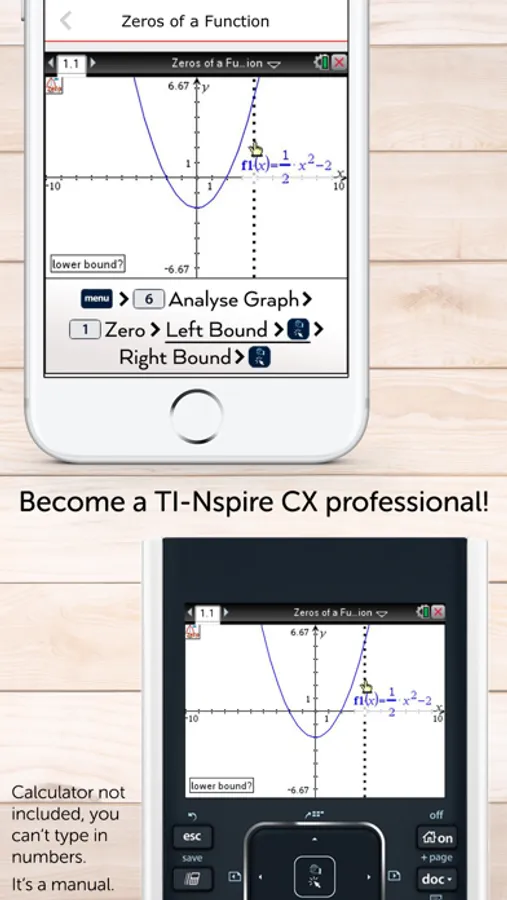
• This manual shows all important functions of the new graphing calculator TI-Nspire CX (and CAS), which are very useful for high school and college. Actual calculator not included!
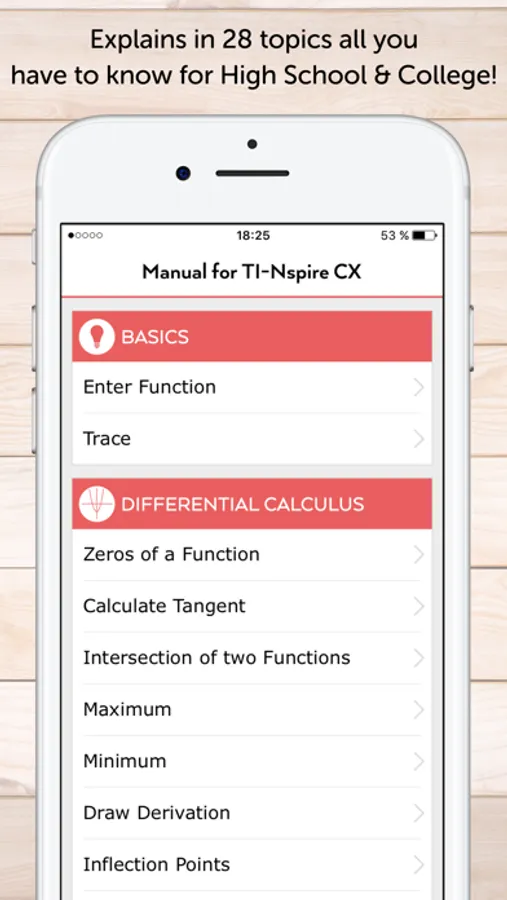
• The app shows the exact key press sequence for 28 topics of Differential Calculus, Solve Equations, Integral Calculus, Matrices and CAS Functions!
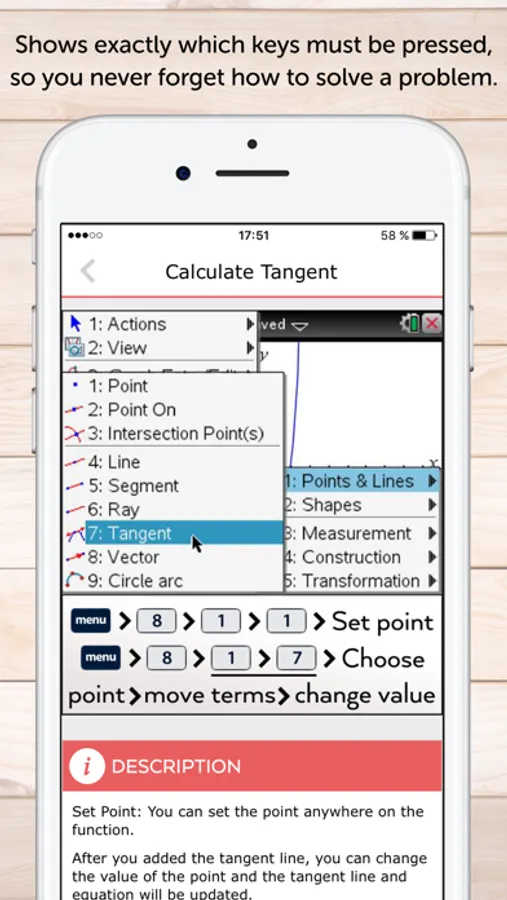
• You can swipe through screenshots of the original graphing calculator which show every step you have to do (220 screenshots in total)!
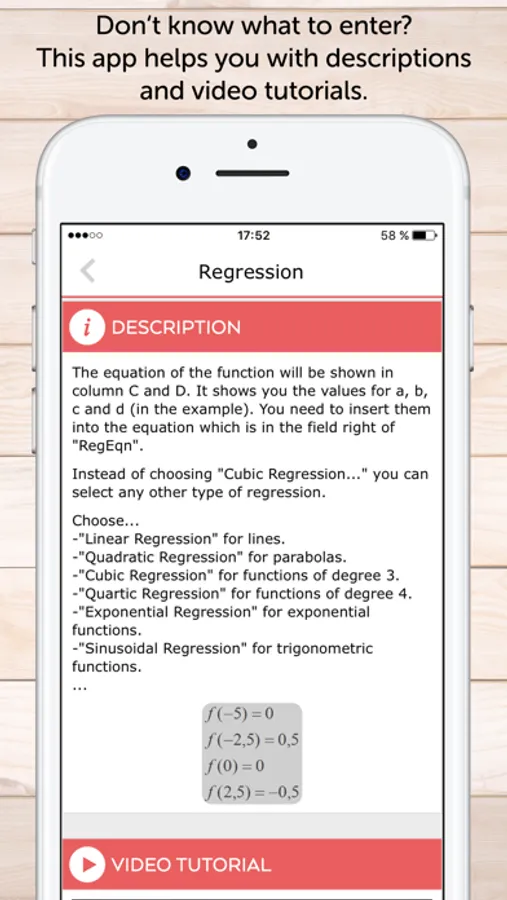
• Or you can watch short video tutorials to see what you have to do.
• Additionally there are helpful descriptions in the app which give some hints and further knowledge.
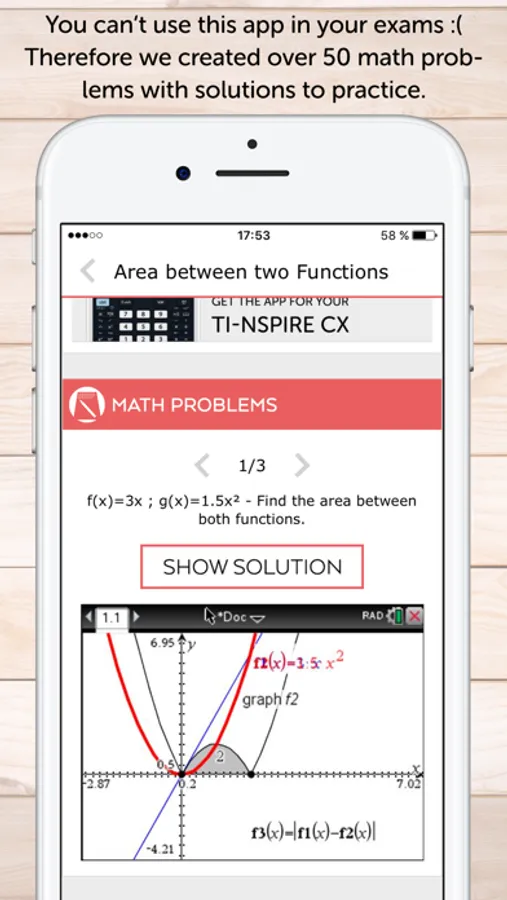
• More than 50 math problems with solutions to practice your skills!
Not yet convinced? Here's how you would benefit from this app:
• Every topic shows a detailed instruction through screenshots of the original graphing calculator TI-Nspire CX which show how to solve the math problem. You only have to swipe to get the next screenshot which looks similar with your calculator display!
• To ”become warm” you have the possibility to insert a sample function in your calculator which is used in the app. The app shows an example for every topic. After that, press the first key of the respective key press sequence on the graphing calculator. Then swipe once again to get the next screenshot. It will look like the display of your calculator. The app contains for each step a picture, so it's easier to solve your math problems and become a TI-Nspire CX professional.
• The app is also useful for preparing your examination, because you often don't remember all instructions of the calculator.
• Your teacher will be grateful as well, because he doesn't have to walk around the classroom until everyone's calculator shows the right solution. You only have to take a look at the app and know how to do!
• The app contains the following topics:
BASICS
• Enter Function
• Trace
DIFFERENTIAL CALCULUS
• Zeros of a Function
• Calculate Tangent
• Intersection of two Functions
• Maxima
• Minima
• Draw Derivation
• Inflection Points
• Find X or Y values
• Regression
SOLVE EQUATIONS
• Polynomial
• System of Linear Equations
INTEGRAL CALCULUS
• Integral in Calculator-Menu
• Integral in Graph-Menu
• Find Area with Absolute Value
• Area between two Functions
MATRICES
• Save Matrix
• Put into Row Echelon Form
• Solve Matrix
• Transpose of a Matrix
• Identity Matrix
• Inversion of a Matrix
CAS FUNCTIONS
• Derivative
• Integration
• Expand an Expression
• Solve Equations exactly
• Find Tangent Line
MATH PROBLEMS
• Practice with over 50 math problems and solutions
• You can practice math problems of a single topic (e.g. Zeros of a Function) or random math problems of Differential Calculus for example.
• As an alternative the app shows you mixed math problems of all topics.
We also have apps for the calculators: TI-Nspire CX (and CAS), TI-84 Plus, TI-84 Plus CE, CASIO fx-9860GlI.
CALCULATOR NOT INCLUDED. THE APP IS A MANUAL.
• This manual shows all important functions of the new graphing calculator TI-Nspire CX (and CAS), which are very useful for high school and college. Actual calculator not included!
• The app shows the exact key press sequence for 28 topics of Differential Calculus, Solve Equations, Integral Calculus, Matrices and CAS Functions!
• You can swipe through screenshots of the original graphing calculator which show every step you have to do (220 screenshots in total)!
• Or you can watch short video tutorials to see what you have to do.
• Additionally there are helpful descriptions in the app which give some hints and further knowledge.
• More than 50 math problems with solutions to practice your skills!
Not yet convinced? Here's how you would benefit from this app:
• Every topic shows a detailed instruction through screenshots of the original graphing calculator TI-Nspire CX which show how to solve the math problem. You only have to swipe to get the next screenshot which looks similar with your calculator display!
• To ”become warm” you have the possibility to insert a sample function in your calculator which is used in the app. The app shows an example for every topic. After that, press the first key of the respective key press sequence on the graphing calculator. Then swipe once again to get the next screenshot. It will look like the display of your calculator. The app contains for each step a picture, so it's easier to solve your math problems and become a TI-Nspire CX professional.
• The app is also useful for preparing your examination, because you often don't remember all instructions of the calculator.
• Your teacher will be grateful as well, because he doesn't have to walk around the classroom until everyone's calculator shows the right solution. You only have to take a look at the app and know how to do!
• The app contains the following topics:
BASICS
• Enter Function
• Trace
DIFFERENTIAL CALCULUS
• Zeros of a Function
• Calculate Tangent
• Intersection of two Functions
• Maxima
• Minima
• Draw Derivation
• Inflection Points
• Find X or Y values
• Regression
SOLVE EQUATIONS
• Polynomial
• System of Linear Equations
INTEGRAL CALCULUS
• Integral in Calculator-Menu
• Integral in Graph-Menu
• Find Area with Absolute Value
• Area between two Functions
MATRICES
• Save Matrix
• Put into Row Echelon Form
• Solve Matrix
• Transpose of a Matrix
• Identity Matrix
• Inversion of a Matrix
CAS FUNCTIONS
• Derivative
• Integration
• Expand an Expression
• Solve Equations exactly
• Find Tangent Line
MATH PROBLEMS
• Practice with over 50 math problems and solutions
• You can practice math problems of a single topic (e.g. Zeros of a Function) or random math problems of Differential Calculus for example.
• As an alternative the app shows you mixed math problems of all topics.
We also have apps for the calculators: TI-Nspire CX (and CAS), TI-84 Plus, TI-84 Plus CE, CASIO fx-9860GlI.
CALCULATOR NOT INCLUDED. THE APP IS A MANUAL.
TI Nspire Calculator Manual Screenshots
Tap to Rate:
Reviews for TI Nspire Calculator Manual
123Tima123!!
I want my money back.
This app is so dumb. It’s not the actual calculator so they lie to you. I want my money back.
uhhhhhhhhhhhhh😭
Thought it was a Real calculator
This is not a real calculator 😭 and I really need one I just spent money on something I didn’t need